Tuesday, 31 May 2011

E-tivity examples and resources

Struggling a bit with our current task to design an e-tivity (or sequence of e-tivities? - I'm not quite clear) for our tutor group, so I thought I'd take some inspiration from what's out there already...

Source: http://edutechwiki.unige.ch/en/E-tivity
E-tivity 1 (related to Stage 1- Access & Motivation)
Purpose - to be able to access the VLE Asynchronous Discussion tool
Task - to post an initial message introducing yourself to others
Interaction - the e-tutor checks that students can access and provide feedback for motivation.
E-tivity 2 (related to Stage 2 - Online Socialisation)
Purpose - to introduce yourself to others in your group
Task - to post a message introducing a topic of the student's choice via the Conference Room tool
Interaction - contributions from others in the group within a 'threaded' discussion. Participation and summary by e-tutor.
E-tivity 3 (related to Stage 4 - Knowledge Construction)
Purpose - to analyse your preferred methods of learning and to consider alternative processes or models
Task - to post thoughts on a particular piece of reading on learning methods
Interaction - others members of the group provide their own interpretations and thoughts. E-tutor moderate and summarise.

Source: https://www.dlsweb.rmit.edu.au/toolbox/elearntrainassess/toolbox/resources/e_space/e_facilitator/advice/sample/sample.htm
A nice little widget (or a text download equivalent) offering several examples of e-tivities at each of Salmon's 5 stages of the e-moderation framework.

Source: http://www.scribd.com/doc/38734622/e-Tivities-Game-Based-Approach
An example of using email-based games as e-tivities.

Source: http://e.foi.hr/engwiki/index.php/Pool_of_e-tivities
Links to examples of e-tivities from language education


Resources relating to e-tivities:

Saturday, 28 May 2011

Developing socialisation - a counter view to Salmon's e-tivities

‘The development of socialisation in an on-line learning environment’, Jones, N. and Peachey, P. (2004)

This paper takes a critical view of Salmon’s five-stage model and questions the validity and usefulness of all the stages as they are presently described by Salmon. It is also an example of a small-scale piece of ethnographic research and evaluation.

The paper describes a number of iterations of an e-moderating course, developed to support teachers/lecturers new to computer-mediated communication. The course adopted a constructivist approach, with social dialogue as an essential feature of the pedagogy.

At Stage 1 (of Salmon's framework) a face-to-face induction workshop was held. This allowed familiarisation with the VLE and for students to experience initial message posting and sharing. 

Each time the course was presented, a relatively high level of informal interactivity was observed at Stage 1, which was followed by a significant drop at Stage 2. It then slightly increased at Stage 3, as would be expected of Salmon's framework. This suggests that there was not strong evidence of the formation of an effective online community during Stage 2, and that the intended socialization which underpins an effective community did not emerge. The authors argue that this is because effective socialization in fact emerged during Stage 1 due to the effective design of induction sessions. Given this success, Salmon's recommendations for Stage 2 e-tivity design may need to focus more on maintaining motivation than on socialization.

Take away thoughts
  • Stephenson and Coomey (2001) - promoting dialogue, and the consequent development of learning communities are important factors contributing to success of online courses.
  • "Social factors as well as intellectual factors are important in e-learning"
  • Development ins elearning have "not provided practicing educators with the wherewithal to reconstitute and embed constructivst ideas within their personal philosophies and teaching practices" (Bonk, 2003).
  • "... for effective learning, the skills of the moderator are more important than the features of the software tools being used..." (Alexander and Boud, 2001).
  • There are contrasting views on whether the socialization stage of a course can/should be carried out entirely online (advocated by Salmon, 2000), or partly face-to-face (advocated by Mason, 2002, who argues that this is one of the 'most important' features of successful online courses.

References:
Jones, N. and Peachey, P. (2004) ‘The development of socialisation in an on-line learning environment’, paper given at the American Educational Research Association Annual Meeting in 2004 [online] http://www.ncolr.org/jiol/issues/viewarticle.cfm?volID=3&IssueID=12&ArticleID=14 (Accessed 10 February 2011).

Alexander and Boud (2001), Bonk (2003), Mason (2002) all cited by Jones and Peachey (2004).

E-tivities - integrated into a campus-university module

‘The integration and implementation of a range of “e-tivities” to enhance students’ interaction and learning’, Pavey, J. and Garland, S.W. (2004)

This is a case study of a UK sport science course that used Salmon’s framework to enhance student interaction.

The authors used Salmon’s five-stage framework to develop their e-tivities, and suggest a template which can be used to map the particular aspects of an activity against each of Salmon’s five stages:
Stage in Salmon's model          Activity
1. Access and motivations Instructions given in face to face session. E-tivity objectives set. Encouraged to familiarise selves with the technology.
2. Online socializationFamiliarization task. Information information exchange encouraged.
3. Information exchangeDiscussion board introduced - allocated tasks using synchronous and asynchronous discussion.
4. Knowledge constructionOnline information gathering, quizzes and discussions - the main part of the e-tivities.
5. DevelopmentOngoing discussion boards with tutor moderation as required. 
The e-tivities developed for this course were delivered through the Blackboard VLE, which was also new to the students/course at the time. Plenty of familiarisation and orientation time was therefore built in to the programme before students were required to engage in the course-specific learning e-tivities. Four e-tivities were developed:
  • formative quizzes - based on a range of online resources and readings, and which provided automated marking and feedback (e.g. drag and drop labelling of anatomical diagrams) 
  • interactive web pages and animations - animations of complex processes, helps students to understand concepts 
  • topic discussions - using asynchronous discussion board. 
  • an online 'lecture' - 90 minute online tutorial using synchronous discussion with students participating in small groups at a number of shared PCs.
Take-away thoughts
  • "Students have ample time to read other students' comments, do research and formulate a detailed response" (Clark, 2001)
  • "Providing guidelines for online activity should be rated as an important criterion for keeping online discussions 'on-topic'." (Beaudin, 1999)
  • Examples of such guidelines for communication are given, and include that groups nominate a spokesperson, that messages should only be posted when invited, that all messages must be directly relevant, and that participation is mandatory.
  • Importance of sufficient time to become comfortable with the technology, and that this is carried out separately to the main activities - "this approach supports the work of Salmon (2000) who found that students need to feel competent about how to use a VLE before they are comfortable with exchanging ideas and information".
  • The tutor can sometimes serve best by staying silent (Rohfeld and Hiemstra, 1995) as the effort of learning is passed to the students, individually and as a community. This approach has been demonstrated to be effective in increasing critical thinking and active learning (Hughes & Daykin, 2002)
  • Tutoring skills include knowing when to stay silent, weaving and summarizing ideas, asking the right questions (not necessarily giving answers), providing consistent support, and introducing and integrating activities into the module.
Reflections
  • 83% of the students felt that web-based material should be developed for other modules... but 69% did not find the online lecture/group chat was a worthwhile experience as an alternative to face-to-face delivery. I wondered whether this might be due to technical challenges, discomfort at potential exposure in front of peers, or an underlying expectation that 'lectures' are didactic rather than constructivist in approach. My own experience has often shown students wanting to be told the answer, and finding it uncomfortable if they are required to construct knowledge more independently or collaboratively. 
  • The paper argues that online discussions might provide a means for students who prefer not to ask questions in front of their peers or lecturer - while this may be true, my gut feeling is that online fora still provide plenty of opportunities for a shy student to feel uncomfortable. They are (usually) still identifiable to the other participants, and there may even be heightened concerns regarding the fact that any comment made may be archived, prolonging the 'agony' of any 'embarrassing' comment or faux pas. 
  • The authors considered that the asynchronous and synchronous discussions were the most innovative aspects of the developments presented. Compared to our current Open University experience on H807 (in 2011), it's hard to feel that this is innovative. However, the paper is from 2004, and more importantly refers to a campus-based module. I think that incorporation of such online discussion in a campus-taught class today may well still be viewed as innovative.
Reference:
Pavey, J. and Garland, S.W. (2004) ‘The integration and implementation of a range of “e-tivities” to enhance students’ interaction and learning’, Innovations in Education and Teaching International, vol.41, no.3, pp.305–15.

Clark (2001), Beaudin (1999), Rohfeld and Hiemstra (1995), Hughes and Daykin (2002) all cited by Pavey and Garland (2004).

Salmon’s five-stage model

Salmon (2002) has coined the term ‘e-tivity’ to describe ‘a framework for active and interactive learning’ (Salmon, 2002, p.1). She argues that participants in online learning groups need to be supported in a structured way through a learning ‘event’, and that it is when this structure is absent that online learning fails.

Salmon suggests that all interactive learning activities should be:
  • motivating, engaging and purposeful
  • based on interaction between people – individuals and groups and resources
  • designed and led by someone who understands their role and has learned the skills of online conference moderation
  • simple, low cost and easy to run
  • reusable.
The key features of e-tivities are:
  • a ‘spark’ – stimulus, challenge, task, problem
  • an online activity – students have to DO something
  • a participative element – students have to respond
  • a summary, feedback or critique – from the group or tutor
  • guidelines – instructions for the activity, an invitation to take part.
Salmon’s five stages are:

Students begin at stage 1 where they require maximum technical and e-moderator support. As they progress, they develop in their online interactions, gradually developing and strengthening the learning community, requiring less support, and engaging more in personal and community knowledge construction. Salmon’s five-stage framework provides the scaffolding structure for learning and, she argues, each of the five stages requires different kinds of activities.

Tuesday, 17 May 2011

Thursday, 14 April 2011

Usability evaluation of the Futurelab web site

Technical
The site downloaded quickly, opening even the big banner graphic fast (I’m sure that’s something they thought about!). The ‘educationeye’ element of the page took a few seconds longer to fill with its content. All links seemed to work and pictures displayed fine. I didn’t come across any audio or video elements, which surprised me a little as I'm so used to seeing embedded video on educational resource sites these days.

The Futurelab web site includes a mini ‘educationeye’ on the front page, but I couldn’t understand why the content was arranged as it was. Education Eye offers “a way to discover and explore new ideas by mapping 100s of the top educational websites, blogs, forums and practitioner case studies.” The list view was obvious, but the ‘full’ view positioned items around the space using some metric I couldn’t fathom.
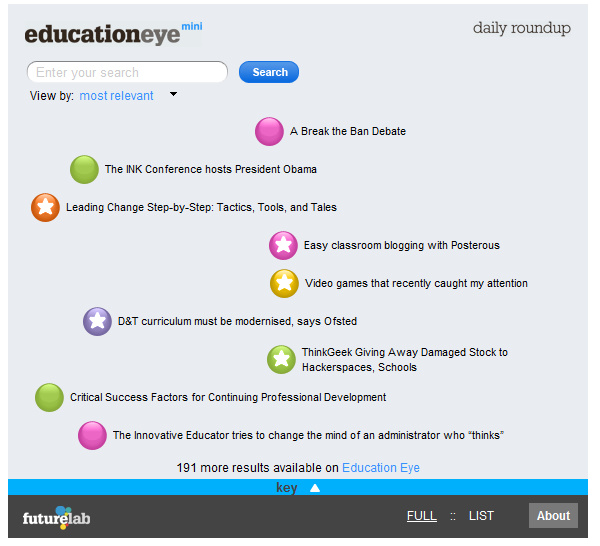
Clicking on the title took me to the full version of EducationEye (http://www.educationeye.org.uk/) which I found took quite a bit longer to load. It has a fancy interface which allows you to scroll around and view articles relating to innovation in education. I’ve been back to look at this site a few times as it feels like it ought to be a really useful site, but the interface gets in the way for me. I feel like I don’t know what I’m meant to do with it. There is the option to subscribe via RSS, which seems more attractive as I’d be able to scan the incoming feed headlines quickly, but I feel like I’m missing something and being incredibly dense and failing to appreciate whatever brilliant design they’ve come up with.

General
The site initially appears easy to navigate with the front page displaying a large menu of 4 aspects:

When you click on one of these, you get an expanded list:
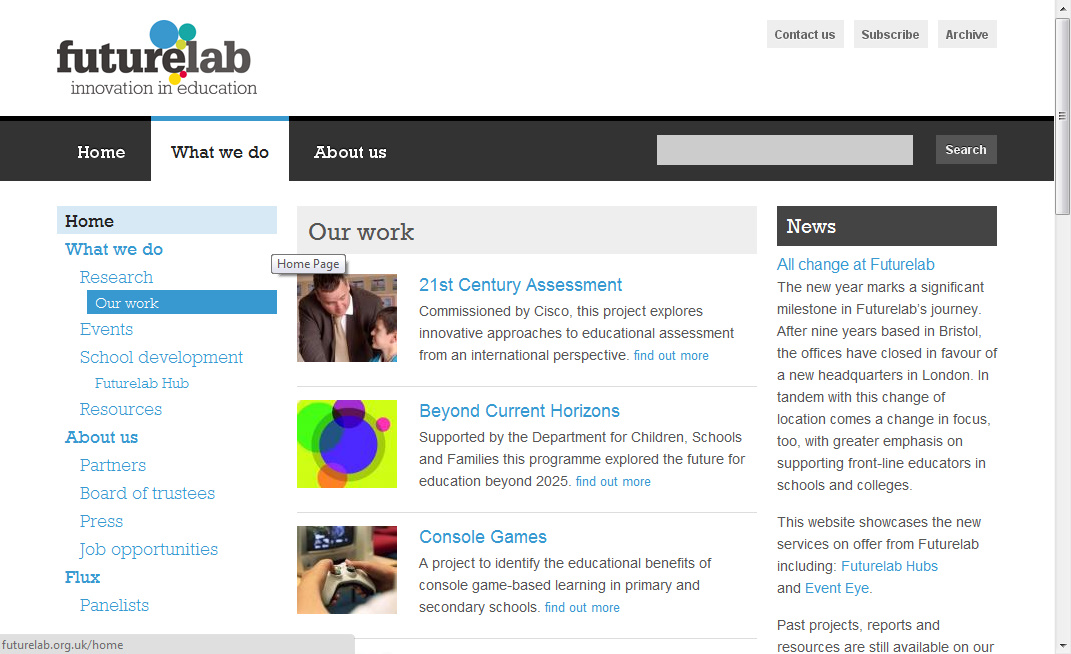
However, this annoyed me, as I wasn’t able to see the detail of what was under each menu item until I'd clicked on the front page link - and then waited for the page to re-draw. Maybe my broadband connection got busier while I was using the site, but it certainly took longer to load these pages than it had the home page.

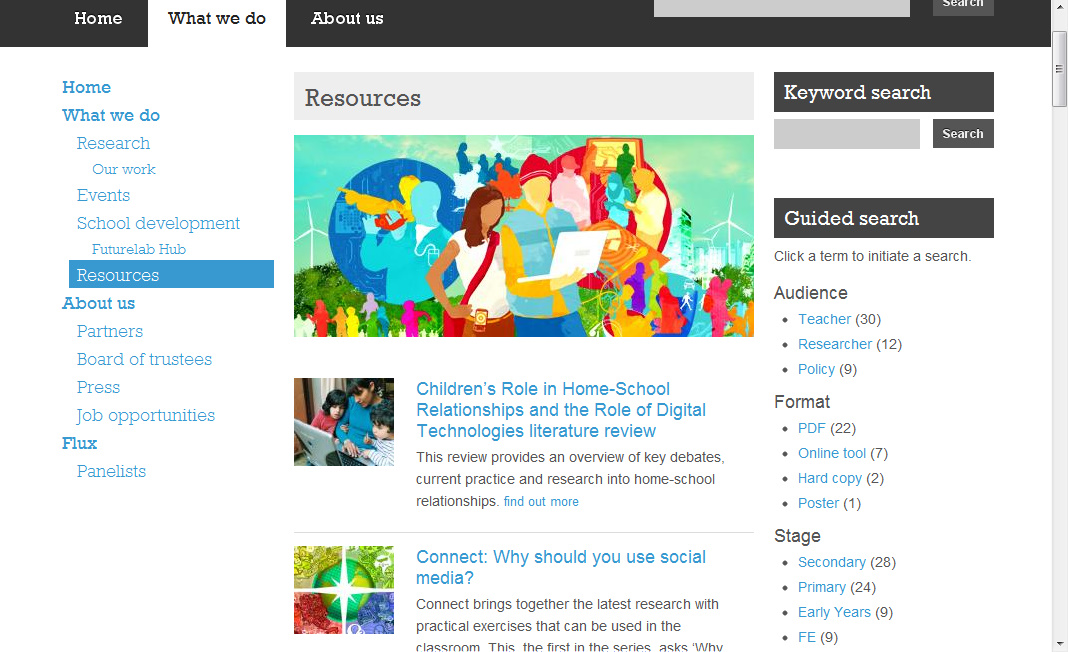
After quite a bit of fiddling, I found that the largest amount of useful looking content seemed to be on the Our Work and Resources pages. And then I discovered that the Resources page had a nice ‘Guided Search’ (effectively search by tag) feature... why wasn’t this on the home page?!
In terms of accessibility, I don’t know how a screen-reader would cope with this site. Perhaps the very simple top level of the menu would be easy for a screen-reader to interpret, but I don’t know how they work. I also don’t know how they work with Flash, but the interactivity provided by educationeye seems likely to pose problems for those with visual impairments.

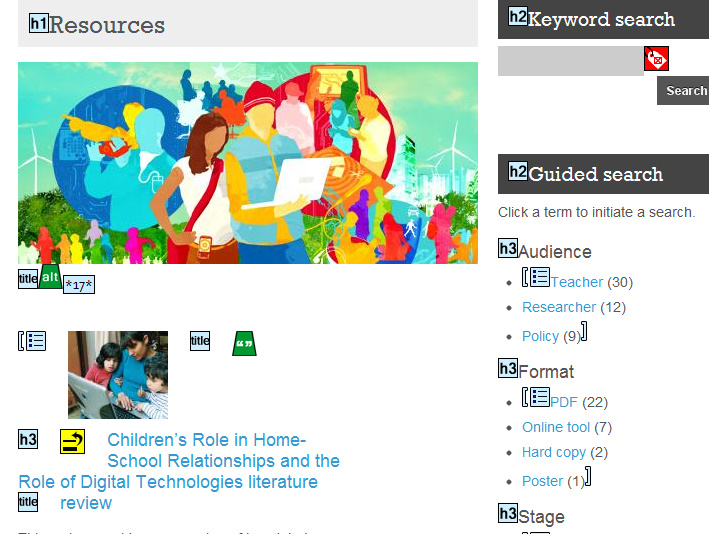
I used the WAVE free web accessibility evaluation tool provided by WebAIM to check the site. WAVE doesn’t provide a complex technical report, but presents the original web page with overlayed icons and indicators that reveal the accessibility of that page. The outcome for Futurelab’s site seemed pretty favourable.
Academic
While this site deals with education, supporting teachers and providing resources, it is not intended to be a learning activity. Therefore, I didn’t really feel it was appropriate to evaluate in terms of pedagogical issues, learning design, sequencing, etc.

Context-specificGiven the intended audience, it might be argued that this site is designed for the technically confident, IT literate user, happy to use the tools available, knowledgable in search techniques, and able to easily recognise the web 2.0 features such as a blog and RSS feed. Conversely, the site could be intended to be for all those educators out there who really want to improve their innovative use of technology in learning, but who are nervous or lacking experience. I think that once they’ve found the Resources page they may be happy, but I feel that the navigation might put some people off - there is often a very real attitude (or at least learned behaviour) that if an item isn’t clickable from the front page, people don’t/won’t go digging for it. This makes web design a real challenge - providing readily available content, without completely cluttering up the front page.

Personal reflectionI have a niggling gut feeling with this site that, while it has good content and I think what Futurelab do is really interesting, the site itself feels like an example of design over substance. I feel that I shouldn’t be saying this... that they are a site focusing on technology in education, they know about design, accessibility, usability, they employ expert designers, and so it must be me who is wrong in not getting on with this site as well as I want to... but maybe, just maybe I’m not the only one?!

Wednesday, 13 April 2011

Reflecting on web 2.0 week

Web 2.0 is so last week! Well, it is if you're on H807 and already being encouraged to move on to evaluating usability, which is the next theme.

I had a lot of fun looking at mashups (more than once!), RSS feeds, social bookmarking, social networking and assessment 2.0.

There are just a few niggling thoughts that I haven't recorded so far...
  • I had fun looking at all these different tools and technologies, as did I think my fellow students, but the fact that they can be included in a course in innovation really shows that despite all the hype, and the growing number of users, there is a long way to go until we reach either widespread acceptance, or toolset stability. In a space of a few short years  tools and trends have come and gone, as shown by this History of Social Media Infographic, and for many people such instability is disconcerting.
  • While there were plenty of papers telling me about how brilliant these web 2.0 tools could be for education, finding actual examples and case studies was much tricker. Mashups seem a great concept, but mixing data from multiple sources isn't straightforward, and while there were lots of obvious suggestions for using RSS feeds and social bookmarking in teaching and learning, it seemed that social networking and assessment 2.0 have much further to go in terms of uptake. 
  • We often come across statements like "young people expect to use networked technologies in their learning", and "the net generation use their social networks for learning and expect their educators to do so too". I think a lot of caution needs to be exercised here. Steve Wheeler warns against accepting wholesale the idea of digital natives and immigrants, and advocates Dave White's alternative theory of visitors and residents. This all reminds me of the excellent Information Behaviour of the Researcher of the Future study by the British Library and JISC. It looks at the following claims about the Google Generation, and presents information which indicates that some of these are myths:
    • Google Generation show a preference for visual information over text 
    • Google Generation want a variety of learning experiences 
    • Google Generation Have shifted decisively to digital forms of communication 
    • Google Generation 'Multitask’
    • Google Generation are impatient and have zero tolerance for delay 
    • Google Generation find their peers more credible as a source of information than authority figures 
    • Google Generation need to feel constantly connected to the web 
    • Google Generation learn by doing rather than knowing 
    • Google Generation prefer quick information in the form of easily digested short chunks rather than full text
    • Google Generation have a poor understanding and lack of respect for intellectual property
    • Google Generation are format agnostic 
    • For the Google Generation, virtual reality may be as real as the real experience 
If you're short of time, pages 13-21 cover the claims and fact/myth findings.