Sunday, 13 February 2011

Elearning concepts

This post is hardly going to be the most insightful. It's simply the report of the result of Googling a number of elearning concepts, in search of definitions. More analysis of these concepts, and how they relate to new or existing and informal or formal learning coming up in the next post... (I hope!)


Blended learning
Mobile learning
Virtual communities
  • Synonymous with Online community: “A meeting place on the Internet for people who share common interests and needs. Online communities can be open to all or be by membership only and may or may not be moderated.”[http://www.astd.org/LC/glossary.htm] 
  • A virtual community is a social network of individuals who interact through specific media, potentially crossing geographical and political boundaries in order to pursue mutual interests or goals. One of the most pervasive types of virtual community include social networking services, which consist of various online communities. The term virtual community is attributed to the book of the same title by Howard Rheingold, published in 1993.[http://en.wikipedia.org/wiki/Virtual_community]
Flexible learning
Work-based learning
  • Work Based Learning generally describes learning while a person is employed. The learning is usually based on the needs of the individual's career and employer, and can lead to nationally recognised qualifications. There are usually three components to Work Based Learning. These are practical skills, underpinning knowledge and key skills.[http://www.thedataservice.org.uk/datadictionary/businessdefinitions/WBL.htm]
Personalisation
Just-in-time learning
Peer assessment
  • Self or Peer Assessment is the process of students or their peers grading assignments or tests based on a teacher’s benchmarks.[1] The reasons that teachers employ Self- and Peer-Assessment are that it will save them time, students may gain a better understanding of the material, and student’s metacognitive skills may increase. Rubrics are often used in conjunction with Self- and Peer-Assessment.[2][http://en.wikipedia.org/wiki/Self-_and_Peer-Assessment]
  • Student assessment of other students' work, both formative and summative, has many potential benefits to learning for the assessor and the assessee. It encourages student autonomy and higher order thinking skills. Its weaknesses can be avoided with anonymity, multiple assessors, and tutor moderation. With large numbers of students the management of peer assessment can be assisted by Internet technology. Peer assessment is assessment of students by other students, both formative reviews to provide feedback and summative grading. Peer assessment is one form of innovative assessment (Mowl, 1996, McDowell and Mowl, 1996), which aims to improve the quality of learning and empower learners, where traditional forms can by-pass learners' needs. It can include student involvement not only in the final judgements made of student work but also in the prior setting of criteria and the selection of evidence of achievement (Biggs, 1999, Brown, Rust and Gibbs, 1994).[http://www.keele.ac.uk/depts/aa/landt/lt/docs/bostock_peer_assessment.htm]
Collaborative learning
  • Collaborative learning is a situation in which two or more people learn or attempt to learn something together.[1] More specifically, collaborative learning is based on the model that knowledge can be created within a population where members actively interact by sharing experiences and take on asymmetry roles.[2] Collaborative learning refers to methodologies and environments in which learners engage in a common task where each individual depends on and is accountable to each other. [http://en.wikipedia.org/wiki/Collaborative_learning]
  • "collaborative learning" refers to an instruction method in which learners at various performance levels work together in small groups toward a common goal. The learners are responsible for one another's learning as well as their own. Thus, the success of one learner helps other students to be successful. Proponents of collaborative learning claim that the active exchange of ideas within small groups not only increases interest among the participants but also promotes critical thinking.There is persuasive evidence that cooperative teams achieve at higher levels of thought and retain information longer than learners who work quietly as individuals. The shared learning gives leanres an opportunity to engage in discussion, take responsibility for their own learning, and thus become critical thinkers.[http://www.gdrc.org/kmgmt/c-learn/index.html]
Learning objects
  • A reusable, media-independent collection of information used as a modular building block for e-learning content. Learning objects are most effective when organized by a meta data classification system and stored in a data repository such as an LCMS.[http://www3.imperial.ac.uk/ict/services/teachingandresearchservices/elearning/abo utelearning/elearningglossary#f]
  • Learning objects (sometimes called 'reusable learning objects' or RLOs) are small, self-contained packets of digital content, typically only 2 to 15 minutes in duration. Learning objects can be aggregated into courses, tagged with descriptive metadata (allowing search engines to find them) and can communicate with a learning management system (LMS), typically using SCORM.[http://www.elearningnetwork.org/wiki/learning-objects]
  • "a collection of content items, practice items, and assessment items that are combined based on a single learning objective" [1]. They will typically have a number of different components, which range from descriptive data to information about rights and educational level. At their core, however, will be instructional content, practice, and assessment. A key issue is the use of metadata. Learning object design raises issues of portability, and of the object's relation to a broader learning management system.[http://en.wikipedia.org/wiki/Learning_Objects]
e-assessment
  • e-assessment is the use of information technology for any assessment-related activity. This definition embraces a wide range of student activity ranging from the use of a word processor to on-screen testing. Due to its obvious similarity to e-learning, the term e-assessment is becoming widely used as a generic term to describe the use of computers within the assessment process. Specific types of e-assessment include computerized adaptive testing and computerized classification testing. E-assessment can be used to assess cognitive and abilities. Cognitive abilities are assessed using e-testing software; practical abilities are assessed using e-portfolios or simulation software.[http://en.wikipedia.org/wiki/E-assessment] 
  • e-assessment is the use of computers and computer software to evaluate skills and knowledge in a certain area. It can range from on screen testing systems that automatically mark learners' tests (often providing almost instant feedback), to electronic portfolios where learners' work can be stored and marked. Both e-Assessment and e-Portfolios are becoming a fundamental part of modern education. They are essential for personalised learning providing benefits for learners, teachers and those involved with the administration of assessment within schools, colleges and training providers.[http://www.ocr.org.uk/eassessment/index.html] 
  • Technology can support nearly every aspect of assessment in one way or another, from the administration of individual tests and assignments to the management of assessment across a faculty or institution; from automatically marked on-screen tests to tools to support human marking and feedback. Clearly, though, for technology-enhanced assessment to be effective, pedagogically sound developments need to be supported by robust and appropriate technology, within a supportive institutional or departmental context. 'Technology-enhanced assessment' refers to the wide range of ways in which technology can be used to support assessment and feedback. It includes on-screen assessment, often called e-assessment. [http://www.jisc.ac.uk/whatwedo/programmes/elearning/assessment.aspx]

Discussing true innovation in elearning

This first week's course forum discussions have had a view to moving closer to an understanding of the concept of innovation in elearning. There have been many interesting points raised and questioning of whether something is or is not innovative. This post tries to draw together a few threads from our discussions which seem to identify criteria or elements of what members of my tutor group considers to be true innovation in elearning.
  • ‘innovation’ in the context of e-learning involves a sense that something may be achieved using that technology that otherwise would not or that the outcome is materially improved using e-technology
  • one of the great benefits is the opportunity for interactivity - innovation in elearning appears not to be static and monolithic
  • innovation by definition in Wikipedia is :"the process that renews something that exists and not, as is commonly assumed, the introduction of something new."
  • it's really important that elearning innovation delivers measurable benefits
  • there is a question of whether the technology made the difference or whether having the technology facilitated the use of different methods. Innovation is the realisation of the idea, and technology could support that
  • innovations in e-learning seem to have shifted the pattern of learning from centralised class room activity to a collaborative yet de-centralised nature
  • innovation in elearning is enabling something different or materially better to occur that cannot happen using existing methods
  •  innovation can be equated with progress, improvement, and with something that is new (in either revolutionary or evolutionary ways). 
  • innovation has the potential to change things for the better, although this may not always be achieved
  • innovation does not necessarily mean something completely new, often it refers to a new use or outcome from an existing (but differently used) method or technology
Colin King found an article on technology for technology's sake, and suggested that its conclusion may be a clue as to how we should approach technology in learning. I think it's a perfect way to sum up this discussion:
"The truth of the matter is that technology is neither the problem nor the solution, it cannot be blamed for what we do with it. It is the way we actively choose to apply it that matters."
Small print:
This post draws heavily on the contributions of tutor group members to our discussion forum. However, as that is a private student-only area I have not added names to suggestions above, but have attempted to paraphrase and draw together themes on which there was agreement across participants. Full credit and references will of course be given in any course assignments.

Wednesday, 9 February 2011

Beginning to explore innovation in elearning

Week 1, activity 3 is beginning to explore what we mean by innovation in elearning. This post summarises and records some thoughts relating to papers on the subject.

Firstly, ‘New technology in learning: a decade’s experience in a business school’ by Rich and Holtham (2005).

This paper describes the introduction of innovative uses of IT into campus-based MBA courses in 1992 - almost 20 years ago. At this point home and business computing was minimal and email was only just beginning to be explored within the academic network. It doesn't go on to describe changes over the decades since, but it's a short paper, so forgiven!

The MBA programme used email based activities with the aim of adding value to their existing process, particularly through fostering effective group work. Valuable opportunities for international collaboration via email were noted, and email was used for simulations in which students could practise management skills. The paper is brief and doesn’t state in detail how value of the interventions was measured.

It is noted that there was reluctance both amongst some faculty and some students. Some felt that IT should be taught as a practical skill or separate topic, and didn’t appreciate its value as a learning tool. Student’s initial computer literacy was variable, and the need to learn basic computer skills obscured further learning outcomes for some.

The paper reports that changes to teaching/learning were achieved by using IT “as an adjunct to existing channels for instruction”. Given the unfamiliarity with technology of many of the students, I wonder if this use of IT as an additional rather than sole medium made the technology more acceptable, appealing and less daunting to use. Perhaps this is a note to not go overboard with innovation, but to ensure that students are guided in their development, rather than thrown in at the deep end?

Students are described as having participate in a “dynamic knowledge network... which was used to encourage professional knowledge creation... exploiting active learning and knowledge building...” These seem to me to be very common aims or uses of ‘innovative’ elearning, i.e. the development of community, social and connectivist learning and knowledge creation and sharing with varying degrees of collaboration. These can be aims of non-e-learning too, so I’m wondering about what additional or further goals innovative elearning might be able to achieve.

The paper concludes that a small group of faculty with only limited technical resources were able to produce innovative, pedagogically sound material using ICT. I wonder if if the group had in fact been larger or had wider institutional support, whether this might have hindered their ability to be flexible and creative in their learning design. Or perhaps, conversely, did the lack of wider support mean that this was a limited experiment? We’re not told about subsequent elearning innovations trialled by this particular institution, and clearly the growing uptake of elearning suggests that lack of support is not excessively stifling. However, a number of student colleagues on H807 have expressed frustration at their own institutions’ reticence to support or adopt innovation. It seems that a certain critical mass might be necessary to get early innovation going, but that attaining wider acceptance is much harder, and indeed may limit the level of innovation which can be achieved within an institution.

Take away points/thoughts:
  • Despite a massive growth in familiarity with IT in past 20 years, we should not assume that technological innovations (even with pedagogical value) will be universally appreciated by students/educators.
  • The need to acquire technical skills could obscure other learning objectives if computer (and wider technology) literacy is assumed or under-supported.
  • Innovation in elearning needs sufficient technical support and positive attitudes towards adoption, but not stifling by large bureaucratic institutions.
  • The paper didn’t talk about how success of the innovation was measured. Measuring what is innovation and what makes a successful innovation are areas for more thought!

The second paper was ‘Innovative teaching: sharing expertise through videoconferencing’ by Lück and Laurence (2005).

This is a 2005 paper referring to a process of developing videoconferencing to support lectures by internationally-absent lecturers to a tourism degree class in 2003. I was somewhat surprised to see the substantial effort which was expended on developing the technology - this wasn’t the case of adopting a commercial off-the-shelf solution and applying it to the interactive lecture scenario, as I would have assumed such technology might have been available in 2003.

The aim of the work was to provide a technical solution which permit guest lecturers, possibly based on another continent to lecture to a local class. The desire was to enhance student knowledge through exposing them to the perspectives of international experts with whom they would otherwise be unlikely to be able to interact. It was this contact with “out-of-class sources” which students rated particularly positively.

The paper also cites the principles of “good practice in undergraduate teaching” by Chickering and Ehrmann (1996), including:
  • encouragement of contacts between instructor and students,
  • involvement of active learning
  • respect for diverse ways of learning
  • prompt feedback.
These were written pre-widescale adoption of elearning, but still provide useful guidance. I was somewhat surprised by the argument that the ‘prompt feedback’ principle was fulfilled by asking students to complete evaluation forms after the event; I was expecting this type of principle to relate to providing feedback to the student on their learning - not an elearning or innovation issue though!

The authors argue that videoconferencing offers new possibilities to higher education, predominantly through the extended opportunities for collaboration. They note that they would prefer not to view videoconferencing as a replacement for face-to-face class time, but as an event integrated into the class syllabus. This seems to echo the argument for elearningHoltham.

Again, this paper was about the use of technology to expand knowledge networks - an apparently emerging theme for H807. The aspect I found hard to believe was that video-conferencing was particularly innovative in 2003. However, it was clearly a novel, engaging and inspiring experience for both the students and lecturers involved in this project, and therefore, for them, innovation in elearning. This raises a new (still ill-formed) thought for me - that innovation is relative to its context. What is new and innovative for one user or user community may be old hat to another. Applying a technology or method in that scenario is innovative, even if not a brand new idea which would be globally ‘innovative’. So, some aspects of innovation can involve re-use, or re-application or techniques. Innovation doesn’t require re-inventing the wheel.

Take-away points/thoughts:
  • Innovation may be through technology development, or through the application of technology in some new way
  • An activity or use of technology may be innovative in one context but not in another
  • Students valued opportunities for interaction particularly highly
  • Providing a technology, even though it may offer a valuable opportunity (e.g. a technological solution to interact with someone geographically distant), does not necessarily mean that the activity will be easy. Every day social influences such as feeling intimidated by a senior/expert, conventions around group interaction, etc will also play a part.

References:
    Rich, M. and Holtham, C. (2005) ‘New technology in learning: a decade’s experience in a business school’, British Journal of Educational Technology – Special Issue on Innovation in Elearning, vol.36, no.4, pp.677–679 http://libezproxy.open.ac.uk/login?url=http://dx.doi.org/10.1111/j.1467-8535.2005.00545.x

    Lück, M. and Laurence, G.M. (2005) ‘Innovative teaching: sharing expertise through videoconferencing’, Innovate, vol.2, no.1 [online] http://www.innovateonline.info/pdf/vol2_issue1/Innovative_Teaching-__Sharing_Expertise_through_Videoconferencing.pdf

    15 minutes of thinking...

    A gentle start on the course theme for week 1, activity 3 - jotting down a few initial ideas of your own about innovation in elearning... here's what I thought.

    Does just doing the same thing but with new technology mean it’s innovative? I think not - technology per se does not equal innovation, but it may lead to or facilitate it. For example, putting a spelling test online doesn’t make it innovative, but offering learners a context in which to understand their results, opportunities to practise using the words, links to example uses, ways to document their progress, or reflect on what they’ve learnt might make it innovative. There seems to be a rush to add an e- or i- prefix, but that certainly doesn't automatically make something innovative.

    Lots of ‘innovative’, or a least new or re-thought ways of learning seem to involve social aspects of learning - communication, collaboration, development of communities of practice. These aren’t innovative in themselves - we have long encouraged them by teaching students in classes rather than as individuals and by gathering together in university departments rather than writing theses alone. What the technology has facilitated is predominantly the opportunity to access a far wider audience/community, rapid publishing and feedback, access to resources and peers and greater opportunity for co-creation and sharing of knowledge.

    Does something have to be truly iconoclastic in order to be innovative? My arguments that ‘just doing it online doesn’t make it innovative’ might seem to suggest so. I'm reminded a bit of Dillenbourg (1992) 'The Computer as Constructorium'. Dillenbourg described an iconoclastic goal of breaking the learner’s passive model of learning. He noted that becoming aware of one’s own knowledge, i.e. the ‘reflection’ process, is of interest not only to researchers on metacognition, but also now to designers of educational computing systems. Dillenbourg wasn't only interested in elearning, but I still feel that elearning that can meet his goal would quite probably be innovative - even today when you might hope our expectations for computer supported learning have moved on.

    What about measuring innovation? Do you need to measure how innovative it is? (and can you anyway?!) We do need to be able to compare effectiveness with existing methods - there is no point being innovative if it doesn't improve something. However, the improvement doesn't necessarily have to be in outcomes - it could be in motivation, student retention, engagement, etc... some of which are tricky concepts to measure too.

    Reference:
    Dillenbourg P. (1992) The computer as a constructorium: Tools for observing one's own learning. In M.Elsom-Cook and R. Moyse (Eds), Knowledge Negotiation.(pp. 185-198) London: Academic Press. http://tecfa.unige.ch/tecfa/publicat/dil-papers-2/Dil.7.1.2.pdf

    Saturday, 5 February 2011

    Getting started with Twitter

    It's been really nice to see some early engagement between course participants using Twitter. I'm looking forward to the extra channel it will provide for H807.

    That said, I've also been recalling how I felt about Twitter before I did H808. I really didn't entirely get what it was all about. After I'd got to understand it a bit I thought I'd write something which might be helpful for other OU new Twitterers. So, what follows is something I posted in a course forum back in September 2009, but I hope it's still relevant for anyone getting started.


    I've recently been dabbling with Twitter, and think I may be beginning to be converted from really not 'getting it', to maybe having an inkling of what it's all about. There are plenty out there who believe Twitter is great for learning... so I want to see what I'm missing out on.

    I thought I'd post some basics, and a few observations here, and invite the more active and experienced Twitterers of H808 [and now H807] to help explore its potential and suggest why it might be a valuable elearning tool.

    The Basics
    • Twitter is a 'micro-blogging' tool - you make posts (called 'Tweets') with a maximum of 140 characters in length
    • Like everything else 'web', you create an account - from here you can post your tweets and follow those of other Twitterers
    • Twitter suggests you use your tweets to answer the question 'What are you doing?', but reading posts such as "I'm eating a cheese sandwich" is dull (and possibly not very educational!) and so many Twitterers post whatever they like
    • You can follow other Twitterers - this means that any tweets they make are added to your Twitter home page

    Taking it a little further
    • You can search Twitter - for whatever you like. It'll return tweets with your search term in (obviously!)
    • You can add hashtags to a word in your tweet, e.g. "I'm studying ePortfolios for #H808 at the moment". This makes it easy to create communities of people interested in the same topic by making it easier for them to find and share info on their topic
    • You can reply to another user's tweet, or address a tweet to them by including @ in front of their username, e.g. "Great presentation by @davidjones at Serious Games conference today"
    • You can 're-tweet', i.e. duplicating/forwarding someone else's tweet, web link or blog post - and it's not cheating! In fact, having your thoughts or comments re-tweeted is a compliment and social currency. Just include RT at the start of your post to indicate that it's a re-tweet
    • All usernames and hashtags in tweets become automatically hyperlinked - so if someone tweets "RT @rob_roy blogging on #eLearning critique", I can click on rob_roy to see all of that user's tweets, or on #eLearning, to see a list of tweets including that tag. This also makes it really quick to move around a community and get introduced to new Twitterers
    • You can add links to your tweets to pass on items which have caught your interest. It's good practice to use tinyurl (or similar) to reduce the length of the URL you paste in.

    As I said, I'm pretty new to Twitter. When I had to visit the Twitter web site to see people's tweets, I didn't get round to it much. Similarly, when I only followed one or two friends there wasn't much point - I got more info about them from their blogs, Facebook or other streams. I really couldn't see why it was any use for education. It was 3 things that helped me to start thinking differently:
    1. understanding hashtags and search - allowing me to quickly find tweets that are on topics of interest
    2. getting the TwitterFox [now re-named Echofon] add-on for Firefox, meaning I get updated tweets from those that I follow automatically delivered to my browser - I don't have to go to the Twitter home page (and I don't have an internet phone). There are all sorts of other similar gadgets out there - others with more knowledge will be able to advise better than I.
    3. finding Carol Cooper-Taylor's eLearning blog posting on 50 ideas for using twitter for education

    I hope this might encourage anyone who is reluctant about Twitter, as I was. Now, anyone who's already using Twitter have any thoughts on its educational uses? Or on its uses for helping us in studying H808[and H807]?

    Monday, 31 January 2011

    Back to the Beginning

    Only it's not exactly back to the beginning, but rather another new start. I'm moving on, and this blog, which I began for my OU H808 'The elearning professional' studies back in 2009/10 is moving on with me. This time I'm embarking on H807 'Innovations in elearning'.

    The course promises that we will 'Discover the latest developments in elearning and reflect on how they are changing relationships between teachers, learners and technology.' We'll be encouraged to consider what innovation is, and what leads to innovations being adopted (or not). I'm also looking forward to the opportunity to develop specific elearning and etutoring skills such as online group moderation, as this will be new to me. I'm particularly keen to see what I can pick up which I can incorporate into my own professional work in developing elearning.

    On a personal level, I'm looking forward to the intellectual stimulation of studying again, and I remember the satisfying feeling that came from returning to study and recognising that as a key part of my identity with H808. Work, however, is busier and more stressful now. There is more intellectual challenge there than there was a year ago, and I'm rather concerned about being overloaded. I know I can be a perfectionist, so this time I need to be a bit aware of that, and try to make sure I keep studying in proportion with other important parts of my life (running, climbing, cello, seeing people!), and accept that there will probably be times when I can't do all I would like to, or perhaps even all the activities.

    Anyway, I'm excited to get started and look forward to things getting underway for real!

    Saturday, 2 January 2010

    Blogging in education

    The use of blogging for education has had substantial take-up - Edublogs alone hosts more than 400,000 educational blogs, and there are many more with other hosts. What began as a tool for users to post their commentary within a chronologically displayed template has now been developed and extended to support a range of educational uses, including:

    [from http://supportblogging.com/Educational+Blogging]
    • Teacher communication (to students, parents or other teachers)
    • Dialogue Generation (where the teacher posts questions about current learning, and the students may respond through the comment facility or their own blogs)
    • Student Blogs (may be public or of restricted visibility, allowing students to communicate their ideas and receive feedback through comments)
    • Teacher Blogs (to share resources, philosophies or methodology, to reflect on practice)
    [from Educational Blogging - EDUCAUSE Reveiew]

    • As replacements for standard class web pages
    • To link to Internet items that relate to the course
    • To organize in-class discussions
    • To organize class seminars and to provide summaries of readings
    • Students may be asked to write their own blogs as part of their course grade

    Duffy & Bruns (2006) divide the uses of educational blogs into academic, organisational and pedagogical:

    "Within a personal academic perspective a blog can support:
    • reflection on teaching experiences
    • categorised descriptions of resources and methodologies for teaching
    • ramblings regarding professional challenges and teaching tips for other academics
    • illustration of specific technology-related tips for other colleagues.


    Within an organisational perspective a blog can support:
    • a common online presence for unit-related information such as calendars, events, assignments and resources
    • an online area for students to post contact details and queries relating to assessment.


    Within a pedagogical perspective a blog can support:
    • comments based on literature readings and student responses
    • a collaborative space for students to act as reviewers for course-related materials
    • images and reflections related to industry placement
    • an online gallery space for review of works, writings, etc. in progress, making use especially of the commenting feature
    • teachers encouraging reactions, reflections and ideas by commenting on their students’ blogs
    • development of a student portfolio of work."

    [Duffy & Bruns (2006) The Use of Blogs, Wikis and RSS in Education: A Conversation of Possibilities]

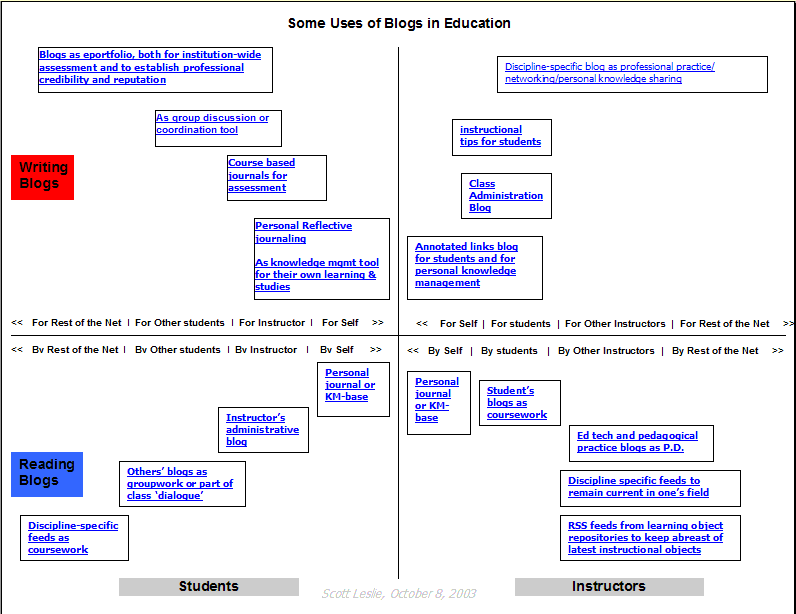
    To consider the variety of uses of blogs in education, Scott Leslie of edtechpost.ca devised a matrix of some of the possible uses, including considering blogs written or read, by students or instructors, written for themselves, for their instructor/students, for their peers, or for the rest of the net. You can find Scott's matrix here, although note that he doesn't consider it a complete list as it doesn't include blogs by institutions or educational support staff such as librarians.

    The benefits cited are many, including:

    • promote critical and analytical thinking.
    • promote creative, intuitive and associational thinking (creative and associational thinking in relation to blogs being used as brainstorming tool and also as a resource for interlinking, commenting on interlinked ideas).
    • promote analogical thinking.
    • potential for increased access and exposure to quality information.
    • combination of solitary and social interaction.
    [Fernette and Brock Eide, cited by Will Richardson (2006) in "Blogs, wikis, podcasts, and other powerful webtools for classrooms", in Duffy & Bruns (2006) The Use of Blogs, Wikis and RSS in Education: A Conversation of Possibilities]

    * foster the development of a learning community
    * give students ownership over their own learning and an authentic voice
    * gives students a genuine and potentially worldwide audience for their work
    * helps students see their work in different subjects as interconnected and helps them organize their own learning
    * teaches a variety of skills

    [Stephen Downes in "Why Use Blogs In Education"]

    * helps students find a voice
    * Creates enthusiasm for writing and communications
    * Engages students in conversation and learning
    * Provides an opportunity to teach about responsible journalism
    * Empowers students

    [supportingblogging.com]

    * to support critical reflection
    * to develop community of pracitce

    [Yang, S.-H. (2009). Using Blogs to Enhance Critical Reflection and Community of Practice. Educational Technology & Society, 12 (2), 11–21]


    Core activity 9.1 calls for me to define a maximum of 6 categories which address the range of blog use in education. The lists and links above show that blogging has been embraced and absorbed into educating in such a way as to make a small set of categories quite a challenge. I have attempted to include the range with the following set.

    Pedagogical uses
    This covers blogs provided by instructors of tutors in order to support their students, to provide activities or resources for coursework, or to develop collaborative work environments for their students. An example of this is Street Math 101, which provides support for a particular group of maths students.

    Sharing and commentary
    This may be by and between educational professionals (and any other interested readers). For example, many like to share useful resources they have discovered, or ask questions and advice about tools or methodologies they are trying, such as EdTech Tools which "celebrates all the latest gadgets, gizmos and good old-fashioned new technologies that are helping to move education forward".

    Others comment on news or issues around education, such as Kapp Notes which discusses issues concerning learning, e-learning and the transferring knowledge from retiring baby boomers to incoming gamers.

    Student owned
    Student owned blogs in themselves have a variety of uses, including learning logs, reflections on learning, development of an ePortfolio, or as a place to complete or store course activities. Examples include Jan's blog of her OU MA (and more) learning Nick Delzotto's Eportfolio Blog, or Emma's PGCE Reflections.

    Organisational
    Some blogs offer a public face of an institution, or may be maintained by other educational support services such as libraries. Some organisations may use their blog to promote news, events, recent publications, or to stimulate debates, for example Flux by Futurelab.


    Issues with blogging for education
    Alongside the range of uses of blogs, there are a range of issues, both pedagogical and technical.

    Pedagogical issues:

    Commenting function - This allows students to obtain feedback on their work, or commentators to engage in debate. However, allowing completely free public access to comment on blogs may be inappropriate for some users (particularly minors), and a careful line needs to be drawn between getting value from the wealth of knowledge of potential commenters, and protecting the privacy or tentative early steps of a noivce blogger.

    Caveat emptor - Blogs are not generally submitted to rigorous review or editorial control. Therefore, while content may be good, readers need to consider the validity of any comments contained in them. While on some blogs with many followers dubious or incorrect statements may be highlighted by comments, for many blogs there will be no critque or correction or content which may be lacking in some respect. From a pedagogical perspective, learning to select and appraise sources is an important skill for students to develop when they read public blogs.

    Plagiarism - If you post model answers online, even after an assignment, they are open to be copied and used by others. While many institutions make use of plagiarism detection software, with the extent of the current blogosphere it's infeasible to consider that all deliberate or inadvertent plagiarism will be detected.

    Technical Issues:
    Tools - There are lots of tools out there which make writing a blog easy - at least the technical part of it! You still have to come up with the content :-)

    Maintenance - Blogs typically grow and grow, with old material archived but available. As new ideas, syllabi or emphases for learning develop, old stuff needs to be actively removed if it is not to confuse or conflict with the current material. This contrasts with the situation with teachers' paper based materials, which are generally not available to students after use.

    Access - Assumes all can access the educational resource that a blog contains. Universal internet access is not yet a reality.

    Privacy and security - Internet security and safety concerns are well publicised. Bloggers need to consider their posts to ensure they do not compromise their identity or physical security. Particular safeguards should be in place when blogs are set up as part of a curriculum for children.


    Further reading

    As ever with the web there is a massive amount of potential out there...
    If you're searching for educational blogs, the choice is overwhelming, but hopefully you'll find something in whatever flavour your prefer in blogged.com's Education directory, or blogcatalog.com's Academic, Learning and Educational blogs list.